M
Maya Chen
How I grew to 10k followers in 90 days.
Paste a post or an article. Get slides in your voice.
An X link, an article link, or the text itself.
How I grew to 10k followers in 90 days.
Replying to @mayabuilds
how did you make these?
Paste a thread, a blog post or rough notes , pick one of 22 themes , and get slides ready for , and . Slides are drawn on your device .
No design tools, no templates to wrestle. Just write.
Paste a link on the homepage, or write each slide in the editor. A whole thread splits into slides.
Cover, title + body, numbered list, big quote, image + text and a call-to-action end slide.
22 themes, custom colors and gradients, photo backgrounds and 8 font pairings.
Your avatar, name and handle in the footer, with slide numbers, dots or "Swipe →".
1080×1350 for feeds, 1080×1080 for LinkedIn, 1080×1920 for Stories and TikTok photo mode.
A free account saves the carousel and downloads a ZIP of PNGs, or a PDF for LinkedIn. Then post natively.
The Slippz editor
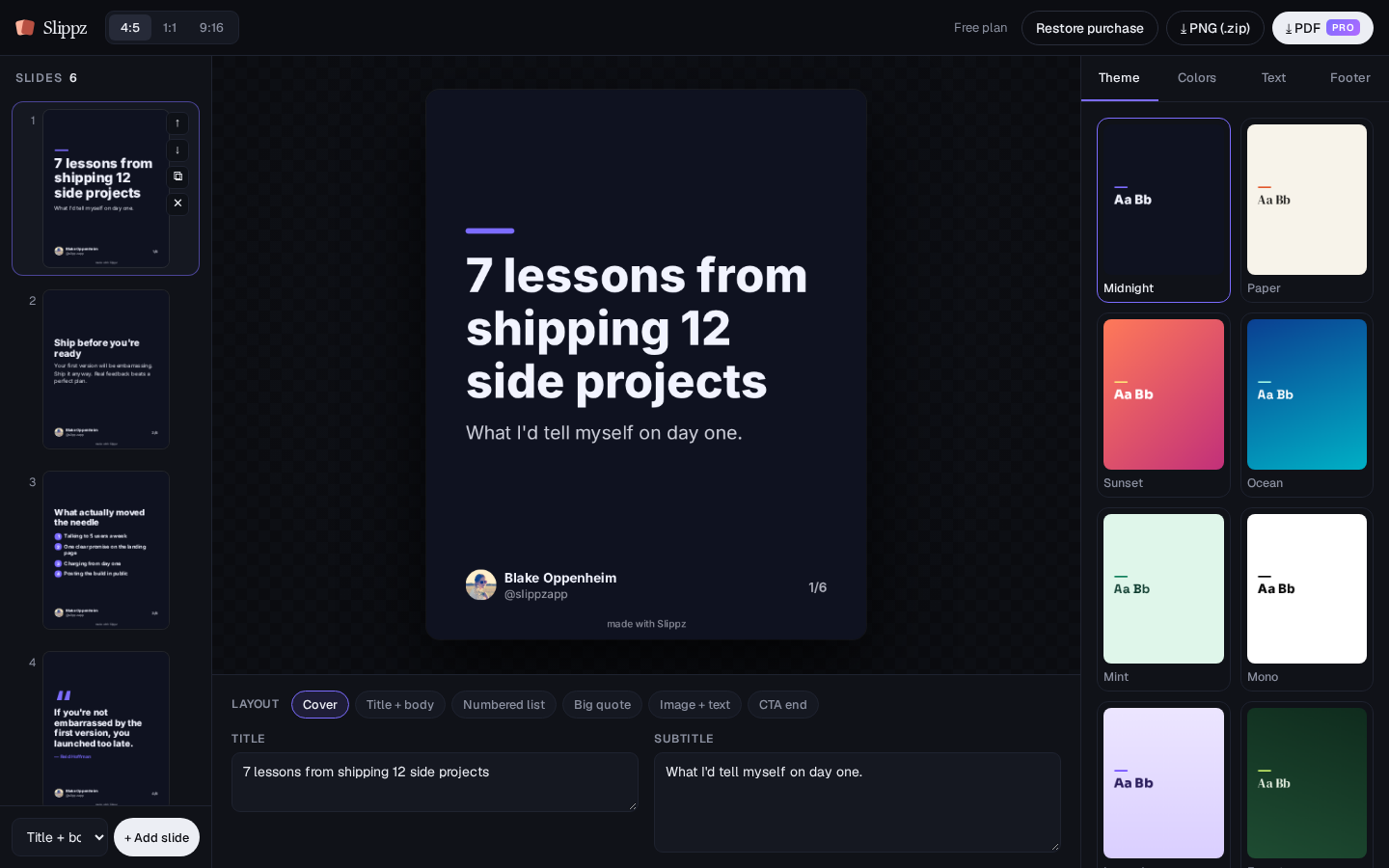
Every theme is fully editable: colors, gradients, fonts and backgrounds.
Slippz is free to use, with every theme and layout. Pro removes the watermark , adds PDF export and four premium font pairings. The first 100 users pay once. After that, Pro is $5 a month, or $54 a year.
$0
$19 one-time
$5/month, or $54/year (about $4.50/month)
After 100 users, Pro is $5/month or $54/year.
The editor draws slides in your browser. Pasting a link or text on the homepage sends that text so the carousel can be written. Saving or downloading stores the carousel on your free account.
Slippz reads the X post or article and rewrites it into 6 to 10 slides in that voice. Your name can go on the footer. Credit the original author on the last slide only if you want to. Private or deleted posts and paywalled articles can't be fetched, so paste the text instead. Free includes 3 of these a day.
A free account is how you save and download. You can paste a link and see the slides first. Pro on the account works on every device. A purchase made while signed out still unlocks that browser.
The full editor: all 22 themes and layouts, custom colors, gradients and photo backgrounds, 4 font pairings, every size, and PNG export once you have a free account. Free slides carry a small Slippz mark and slippz.com. Homepage drafts are 3 a day.
For the first 100 users, no: you pay $19 once and keep Pro forever. After that, Pro is $5/month or $54/year (about $4.50/month), and you can cancel anytime.
Sign in. Pro on the account is already there. You can also paste the order ID from your Stripe receipt (it starts with cs_) under Restore purchase.
1080×1350 (4:5), 1080×1080 (1:1) and 1080×1920 (9:16), as PNGs in a ZIP, or as a PDF with Pro.
Paste it, see the slides, then save them to a free account.
▶Paste a linkFound this useful?
One line on the last slide. Everything else stays yours.
Today's free drafts are used. Pro continues this one.
$19 once